Hosted Components 🧶
Payment-method agnostic by design — here's how Hosted Components gets you there.
Hosted Components gives you one unified checkout across every supported payment method, so you don't build separate flows for each one — or the checkout UI itself. You get the Payments REST API for backend operations and the JS WebSDK for the checkout experience, working together as a single integration surface instead of two you stitch together yourself.
How does it work?
Three parts work together to complete a payment:
- The Consumer initiates the payment by interacting with your frontend — for example, clicking "Pay Now."
- The JS WebSDK presents the checkout interface to the Consumer and communicates with the Payments API on their behalf.
- The Payments API handles the backend operations — creating and managing payment objects, processing the payment, and updating its status.
See it in action 🧶
From the first click to a confirmed transaction, three participants — the Consumer, the JS WebSDK, and the Payments API — hand the payment off to each other in seven steps, summarised in the diagram below.
Choosing your integration: server and checkout
With the flow in mind, two decisions are left before you build: how you handle payments on your server, and how you present checkout to your customer.
Step 1: Choose your server flow
Your server flow covers the backend steps needed to implement the right payment process for your business model. This means integrating with the Payments API to handle payment creation, status updates, and execution.
Options:
- One-time payment — a single payment for goods or services.
- Recurring setup with payment — captures payment details during an initial payment for future use.
- Recurring setup without payment — saves payment details without making an initial payment.
See the Server Flow guide for a detailed walkthrough of each option.
Step 2: Choose your checkout flow
Your checkout flow covers the frontend steps needed to implement the right payment process for your checkout. This includes configuring and using the JS WebSDK, which simplifies rendering and managing the checkout experience.
The JS WebSDK is highly configurable, as shown in the image below. Based on your checkout requirements, you can choose the best-suited integration flow.
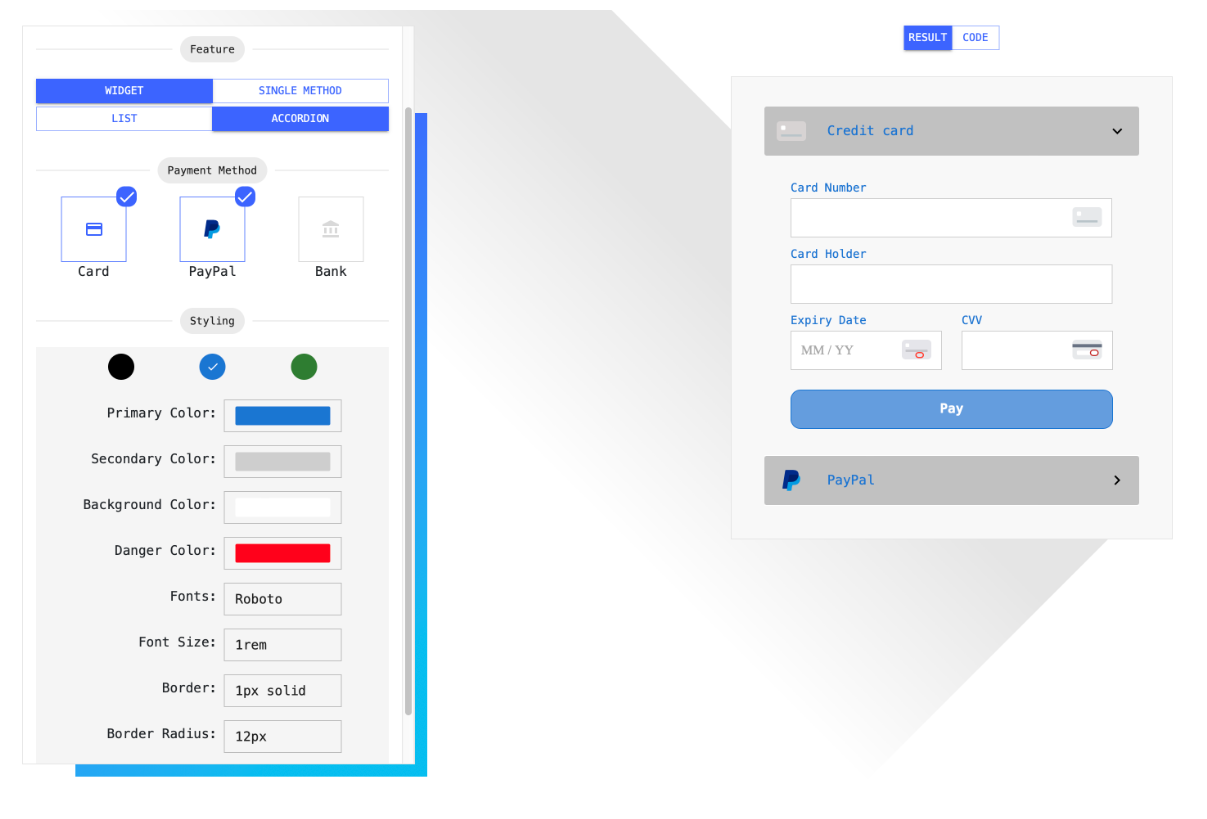
The JS WebSDK is being redesigned by the team. This feature is not yet implemented on the Gateway and is subject to change.
Where to go next 🧶
Once Hosted Components is released, this page will link directly to a working Quickstart and live guides — for now, reach out to your Paystrax contact to get early access or updates on availability.
- Follow the Quickstart to make your first test payment.
- Review Authentication & Environments to get your API keys and confirm your sandbox and production URLs.